Your score stream, live in minutes
A broadcast-style scoreboard that updates by itself, pop-ups for every four, six and wicket, and your commentary on top. Stream to YouTube and Facebook at the same time, straight from one app.
Windows 10 and 11 · Scores and commentary only, no match footage

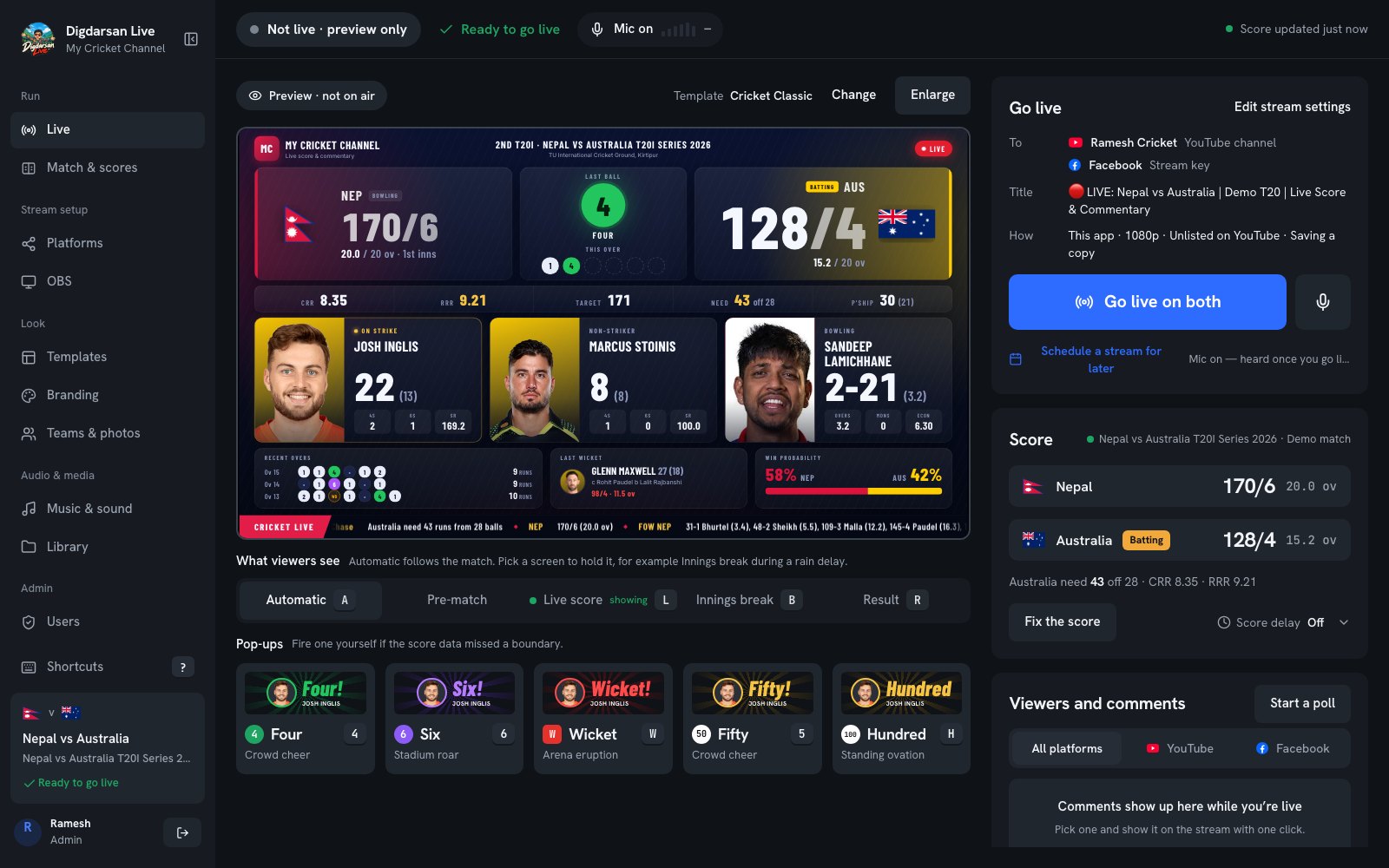
The control room. Everything for a match fits one screen.
Everything a score channel needs
No OBS setup, no browser sources, no fiddling. Pick a match, press Go live, start talking.
Scores that update by themselves
Runs, wickets, overs, batters, bowler, recent overs and the chase, ball by ball. Fix the score yourself in seconds if the data is behind.
Pop-ups with crowd sounds
Four, Six, Wicket, Fifty and Hundred, with the batter's photo and a cheer. Automatically, or one key press each.
Your voice on the stream
Talk over the match with your own mic. A level meter, one key to mute, and music for the breaks.
YouTube and Facebook at once
Tick YouTube, Facebook or both. Stop one while the other carries on, and add it back any time. It reconnects by itself if the internet drops.
Viewers' comments and polls on screen
Show a viewer's comment on the stream with one click, or run a "Who wins?" poll that viewers answer in the chat.
Five looks, your colours
Classic, Commentator Cam, Neon Stadium, Studio Light and a vertical one for Shorts. Switch while live; add your logo and colour.
What your viewers see
The score, the players with their photos, the last wicket, who's winning, and a scrolling bar with your messages. Hold any screen yourself, like the innings break during rain.
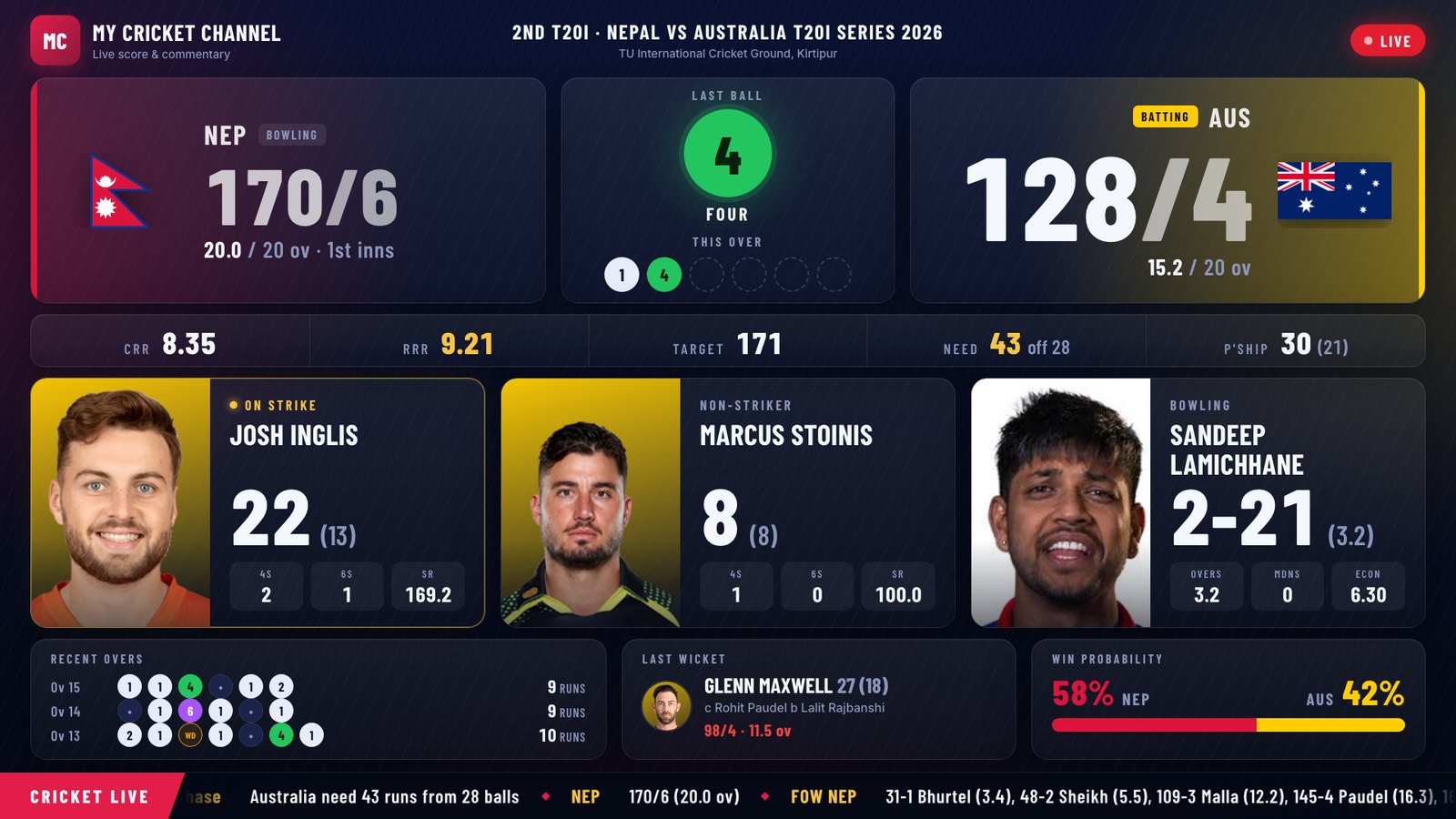
On air: the red frame means viewers see it now.
From download to live
Set up once. After that, going live is one button and a 3-second countdown.
- Download and installThe app installs in seconds and keeps itself up to date.
- Sign inContinue with Google. New accounts are approved by the Digdarsan Live team.
- Connect your channelsSign in to YouTube, and paste your Facebook stream key from Live Producer. You can do both right from Go live.
- Pick a match and go liveChoose the match, tick YouTube, Facebook or both, press Go live and start talking.
Download Digdarsan Live
For Windows. Free to download. Sign in after installing, and you can stream once your account is approved.
Windows may say "Windows protected your PC" because the app is new: click More info, then Run anyway.
What you need
- Windows 10 or 11, 64-bit
- 4 GB of memory (8 GB recommended)
- Internet upload of 5 Mbps (10 Mbps for two platforms at once)
- A microphone for your commentary
- A YouTube channel with live streaming turned on, and/or a Facebook Page or profile
Questions
Does it show the match video?
No. Digdarsan Live streams scores, graphics and your commentary only, never match footage.
Who can use it?
Anyone can download it and sign in. Streaming is approved by the Digdarsan Live team: after your first sign-in, wait for approval and the app opens by itself.
Do I need OBS?
No. The app streams by itself. If you already use OBS, you can still stream through it.
How does Facebook work?
The same way OBS does: paste your stream key from Facebook Live Producer once. When you go live, Live Producer opens in your browser with your video in it, and you press Go live there.
Can I stop one platform and keep the other?
Yes. While live, each platform has its own stop button. Stop Facebook and YouTube carries on, or the other way round, and add it back whenever you like.
Is there a Mac version?
Not for now. Digdarsan Live is for Windows.
What does the app do with my YouTube and Facebook accounts?
Only what you ask it to: create and end your live streams, and read your stream's comments and polls. Your sign-ins and stream key stay on your computer. See the privacy policy.